• About Us
  • Contact Me
  • Review Request
  • Guest Post
  • iPhone 14 WALLPAPER
    • iPhone XR and iPhone XS Wallpapers
  • Store
  • Gambling
  • iPhone 15 Wallpapers

iPhonecaptain | iOS 17 Tips, Jailbreak Tweaks and App Reviews

"Bringing the Best For Apple Devices Daily"

A2Hosting

  • Home
  • iOS 16 Wallpaper Downloads
    • macOS Ventura Wallpaper Downloads Here
      • MacOS Wallpapers 2022
      • 5K iMac Wallpapers Stock
    • iOS 10 Wallpaper
    • iOS 9 Wallpaper
    • iOS 8 Stock Wallpaper
    • iPhone 7 Wallpaper
      • Super Mario wallpapers for iPhone
      • iPhone 6 Plus HD Wallpaper
      • iPad Air or iPad Mini Retina HD Wallpaper
      • Yosemite Wallpaper
      • iOS 7 Wallpaper
      • Wallpaper New iPad 3
      • iPhone 5 Wallpapers
    • iPhone 6 Wallpapers
  • iPSW Firmware
    • iOS 8 iPSW Downloads
  • Top Cydia Sources 2017
    • Top Cydia Repo 2016
    • Cydia Sources 2014
    • Sources 2013
    • Cydia Sources 2012-13
  • Free Cydia Tweaks
    • Winterboard Themes
    • Favorite Tweaks
    • Top iOS 8 Tweaks
  • App Reviews
    • PRODUCT REVIEWS
    • Review Request
  • iPhone Tips
    • Giveaway
  • iPA Library
    • Emulators
    • iOS 10 Hacks
  • Jailbreak Download
You are here: Home / Fix Screen Shrinking

Fix Screen Shrinking

If you’ve jailbroken your iPod touch or iPhone 4S running on iOS 5/5.0.1 and your screen has shrunk down to 1/4 of its size, don’t despair because there’s a fix for it.

All you need to do to resolve the 1/4 screen issue is to
-Install SBSettings from your Cydia
-Launch the app and tap on ‘Safe Mode‘

Reboot and the issue should be disappeared.
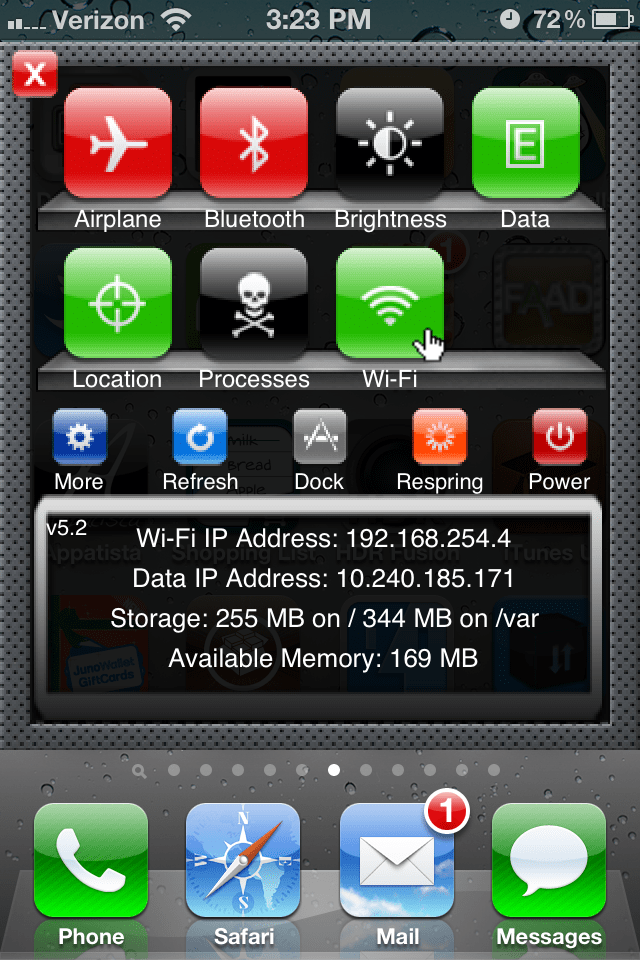
If all else fails connect device to computer. Open Fun-Box, if you need to download it just google it. Start deleting the last app or tweak you installed. After you delete the problem you think. Reboot

If nothing above fixed your problem, your SOL, RESTORE. Thats all is left. Hope this helped. Leave a comment and let me know how it goes.

Comments

  1. James says

    April 14, 2013 at 2:50 pm

    I know this is referring to iOS 5 but the problem also exist in
    ios6. The fix I’ve found is having the popular app Icleaner (icleaner pro will also work) and what you have to do is allow the app the run and clean. When prompted to respring do so, after the respring you will have your full in faulty screen back 🙂

    Reply
  2. Apremedic says

    January 26, 2017 at 2:21 pm

    I amm tr?ly pleased t? glance at this weblog posts ?hich carries tos ?f heslpful
    f?cts, thank? forr providing t??se kinds off statistics.

    Reply

Leave a Reply Cancel reply

Your email address will not be published. Required fields are marked *

Search The Site

SiteGround

Ad - Web Hosting from SiteGround - Crafted for easy site management. Click to learn more.

RSS feed: Follow Our RSS Follow Our RSS

  • Lock Your iPhone Duo Screen When Folded: A Quick Guide

Archives

RETURN TO TOP OF PAGE   Privacy Policy

Copyright © 2026 iphonecaptain Developed by Bytesflow Technologies