
 iOS 5 has brought many new features to the devices. Some features are not so prevalent for the everyday users. Here is a list of a few of the hidden features I enjoy. I will update this list as I find more.
- Ability to name your device without using itunes. Simply go under Settings—General—-About——Rename Here
- Create Shortcuts for typing. Settings—General—-Keyboard—-Shortcuts. Here you can add shortcuts until you’re heart’s content.
- Turn on iCloud Backup. Settings—iCloud—Account info. At Bottom of page turn on backup for mail, contacts, calendar, reminders, bookmarks, notes, photo Stream, documents, Turn on Find my iPhone.
- Delete phone calls from the springboard. Simply swipe finger left to right or right to left on the desired contact, name, or phone number to delete. Simple hey…

- Delete an Entire Contact from address book. Pull up the desired contact to delete. Select edit on top right of page. Scroll to bottom of page. Tap delete contact.
- Show More or fewer Messages. Setting—-mail,contacts,calendars—-under mail select show—select 100,200,500,1,000 messages
- Delete Messages by swiping left to right on desired message to delete under messages.
- Delete Playlist, Artists, Songs, Albums, more by swiping finger over desired selections to delete.
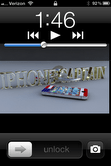
- Double Click Home To Start iPod from Lockscreen and Use Camera from lockscreen to take photo/Video. Awesome feature. Camera will be ready to perform within 1-2 seconds. In previous iOS versions you had to unlock then the application had to load. It took several seconds to start camera. Risking the loss of the unforgettable moment.
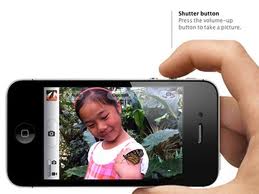
- Take Photo with Volume +Button. This is a great way to take a photo in landscape mode.


Leave a Reply