
ProCamera 3.3is a very nice photo taken application for the iPhone 4, 4S, and
iPod fourth-generation. It can only be used with devices that have a camera. It’s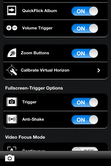 basically a camera application for the device. Since Apple has left many needed features off of their camera application. It gives developers the opportunity to show their abilities through making better applications.
ProCamera has many nice features included. It has an ability to take both photo and video. It has several nice filters that can be added to the photo or video. It has anti-shake, timer, burst mode, big button, geo-tags, grid lines, tags, and more. As you can see it has a pretty lengthy number of features. You can also share your photo library with others over a Wi-Fi connection. The application will give you a URL to type into a computer and you simply go to the computer on the same wifi connection and typed that in and you can view and sink the photos from the idevice onto your computer. ProCamera also allows the user to add filters to still shots after they have been taken. The video filters work just the opposite. You have to select the desired filter before taking the video. I guess that’s a small price to pay for this feature. It would’ve been really nice to be able to take the video and apply the different filters after taking the video. This would’ve made selecting the best filter much easier.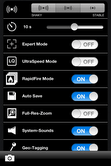
Overall, I have to say ProCamera is one of the top camera applications in the app store. If you enjoy taking and editing photos or video, this is definitely worth the price. The best feature of ProCamera is it does both photo and video. This application is definitely one of the few I consider a must have. I will go a bit further to say, “It deserves the App Hall of Fame Award.”
Leave a Reply