
If you’re looking for a document and file management app suitable for your iOS device, Good.iWare’s GoodReader has already gained a loyal clientele and a reputation as such. Ever since it was first launched, the app has already been able to help sync documents and files with various sources– a computer, another iOS device, or other cloud-storage options. Through this, you can keep your files organized and up-to-date whenever you need them.
Recently, the developer has launched its 4.0 update for the app. Having realized the need to release the update as a separate app, they have introduced the GoodReader 4 iOS app to continue its success. Along with its launch, the app comes with a discount that any iOS device user can take advantage of. For a limited period of time, you may download the app for only $2.99. Compared to its predecessors, GoodReader 4 comes as a universal app optimized for iPhone, iPad, and iPod touch devices.
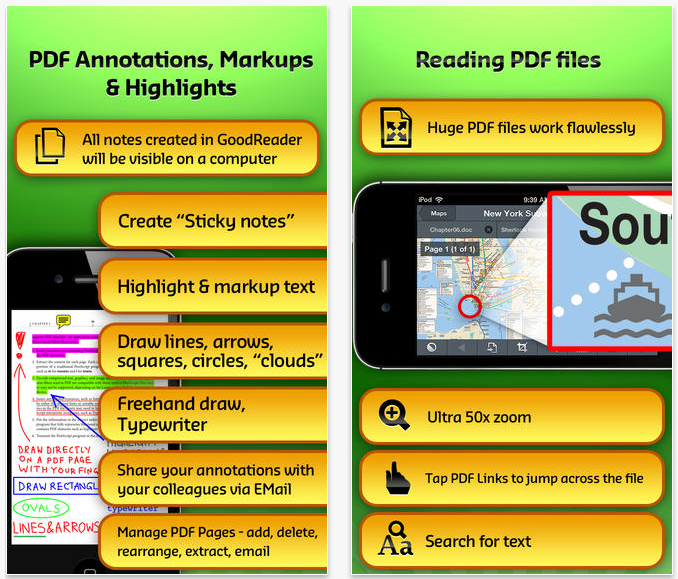
The features available on GoodReader 4 app include an impressive PDF reading feature that makes it a must download. Additionally, the app comes with features such as annotation, auto-sync, and access to servers. While these similar features are available on previous apps, the GoodReader 4 app now comes with an array of new features that make it an exciting tool to use. Among these new features include a PDF Page Slider, PDF Page Management, collapsible tool area on main screen, icon view for file browser, and a ‘New PDF’ button. By adding these new features, the app developer has been able to make access to the app a lot easier for anyone who needs to do so quickly.
If you’re in the market for an app that you can use to organize your files, GoodReader 4 iOS app is definitely something you should consider. The fact that it comes with a limited time rate of $2.99 makes it enough reason to download the app as soon as possible. While the app is universal, it works best on iOS devices running on iOS 6.0 or later. Get the app today so you’ll see why you don’t need another PDF app for your device!


Leave a Reply