• About Us
  • Contact Me
  • Review Request
  • Guest Post
  • iPhone 14 WALLPAPER
    • iPhone XR and iPhone XS Wallpapers
  • Store
  • Gambling
  • iPhone 15 Wallpapers

iPhonecaptain | iOS 17 Tips, Jailbreak Tweaks and App Reviews

"Bringing the Best For Apple Devices Daily"

A2Hosting

  • Home
  • iOS 16 Wallpaper Downloads
    • macOS Ventura Wallpaper Downloads Here
      • MacOS Wallpapers 2022
      • 5K iMac Wallpapers Stock
    • iOS 10 Wallpaper
    • iOS 9 Wallpaper
    • iOS 8 Stock Wallpaper
    • iPhone 7 Wallpaper
      • Super Mario wallpapers for iPhone
      • iPhone 6 Plus HD Wallpaper
      • iPad Air or iPad Mini Retina HD Wallpaper
      • Yosemite Wallpaper
      • iOS 7 Wallpaper
      • Wallpaper New iPad 3
      • iPhone 5 Wallpapers
    • iPhone 6 Wallpapers
  • iPSW Firmware
    • iOS 8 iPSW Downloads
  • Top Cydia Sources 2017
    • Top Cydia Repo 2016
    • Cydia Sources 2014
    • Sources 2013
    • Cydia Sources 2012-13
  • Free Cydia Tweaks
    • Winterboard Themes
    • Favorite Tweaks
    • Top iOS 8 Tweaks
  • App Reviews
    • PRODUCT REVIEWS
    • Review Request
  • iPhone Tips
    • Giveaway
  • iPA Library
    • Emulators
    • iOS 10 Hacks
  • Jailbreak Download
You are here: Home / App news / How to create Great iphone Apps

How to create Great iphone Apps

October 12, 2012 By Mitch Stevens 1 Comment

  • Facebook
  • Twitter
  • Pinterest
  • LinkedIn
  • Reddit
  • Comments
  • Subscribe

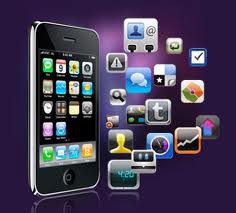
iphone apps creator

How to create Great iphone Apps

Iphones are flooding the market with the changing market needs for more handheld iDevices. However, if you are making iphone applications for the first time, the process can be hard to you. People who are experienced enough do not face major challenges when making the apps. There are different tools that you can use to make amazing iphone apps although some are hard to use.

Most available apps in the market are not the best as they just give you a limited access to making codes. When submitting the product to apple, there may be barriers, which result making your application hard to go through. There are simple ways that you can use to develop apps by yourself. You can create your own apps simply without asking for help from professionals or from the company that makes the apps.

The first thing that you will need is searching over the internet for samples. You will learn simple codes online and this gives you a blueprint of making better apps in the future. Although the process may seem tedious, it is easy learn the process with online codes. You can first start with simple codes and then go on to better codes later. You can start from this point and continue enjoying great results from the available apps. The codes are easy to study and apply and this makes your applications with much ease.


iphone apps

There are many samples in the market today and you can search at Github for more samples. The samples are easy to download and install on your iphone. You can also install them in your computer. Before you think of using the sample, you should ensure that you have the right one that is safe and does not pose any problem to your iDevice.

Making of apps is a very long process and requires time. This can make it tedious since you will not meet your needs. There are different ways through which you can make the apps but looking at the time that is required, you may change your mind and go for the ready ones. The process of building your app from the ground takes a lot of time and this can be a hassle to you. There are many websites selling the apps and you can buy your desired app then just install it easily. With the increasing need of apps, you will continue enjoying amazing types in the market that meet your needs.


  • Facebook
  • Twitter
  • Pinterest
  • LinkedIn
  • Reddit
  • Comments
  • Subscribe

Filed Under: App news, News, Tips Tagged With: buy apps online already made, how to build apps, top ways to get iphone apps online

Latest Post

  • iOS 16 Features Exclusive Only to Newest iOS Devices

    iOS 16 Features Exclusive Only to Newest iOS Devices
  • iOS 16 Brings Battery Drain Plus Tips to Improve Battery Life After iOS 16

    iOS 16 Brings Battery Drain Plus Tips to Improve Battery Life After iOS 16
  • Reminders App iOS 16: How to Use Templates on Your iPhone, iPad, or Mac

    Reminders App iOS 16: How to Use Templates on Your iPhone, iPad, or Mac
  • #ToonMe Best Caricature Creator: Person or Pet Into Cartoon 2022

    #ToonMe Best Caricature Creator: Person or Pet Into Cartoon 2022
  • Macbook Air M2 Wallpaper Downloads

    Macbook Air M2 Wallpaper Downloads

Stay Up To Date On All The Latest iOS News!!!

Never miss out just because you can't be here everyday... Join us for the latest and most popular news. Get our best delivered in your inbox with our latest and best guides and How to's.

About Mitch Stevens

Author of E-book, “Learn Jailbreaking & Top Tweaks” in Amazon.and enjoys anything tech related.  Just recently released an E-course in Udemy for Yosemite Mac users titled, "Learn Yosemite Plus Tips To Become 10x More Productive".  A "MUST Purchase" for users wishing to get the most from their Mac daily whether your a student or work from home.  Guarantee you will be glad you did.

Trackbacks

  1. How to create Great iphone Apps | iPhoneCaptain | How to Make Iphone Apps says:
    October 16, 2012 at 10:38 am

    […] However, if you are making iphone applications for the first time, the process can be hard to you. develop iphone apps – Google Blog Search This entry was posted in How To Make Iphone Apps and tagged apps, Create, Great, iphone, […]

    Reply

Leave a Reply Cancel reply

Your email address will not be published. Required fields are marked *

Search The Site

SiteGround

Ad - Web Hosting from SiteGround - Crafted for easy site management. Click to learn more.

RSS Follow Our RSS

  • iOS 26: Adaptive Power, Clear Icons and More – Key Features Explained

Archives

RETURN TO TOP OF PAGE   Privacy Policy

Copyright © 2026 iphonecaptain Developed by Bytesflow Technologies