
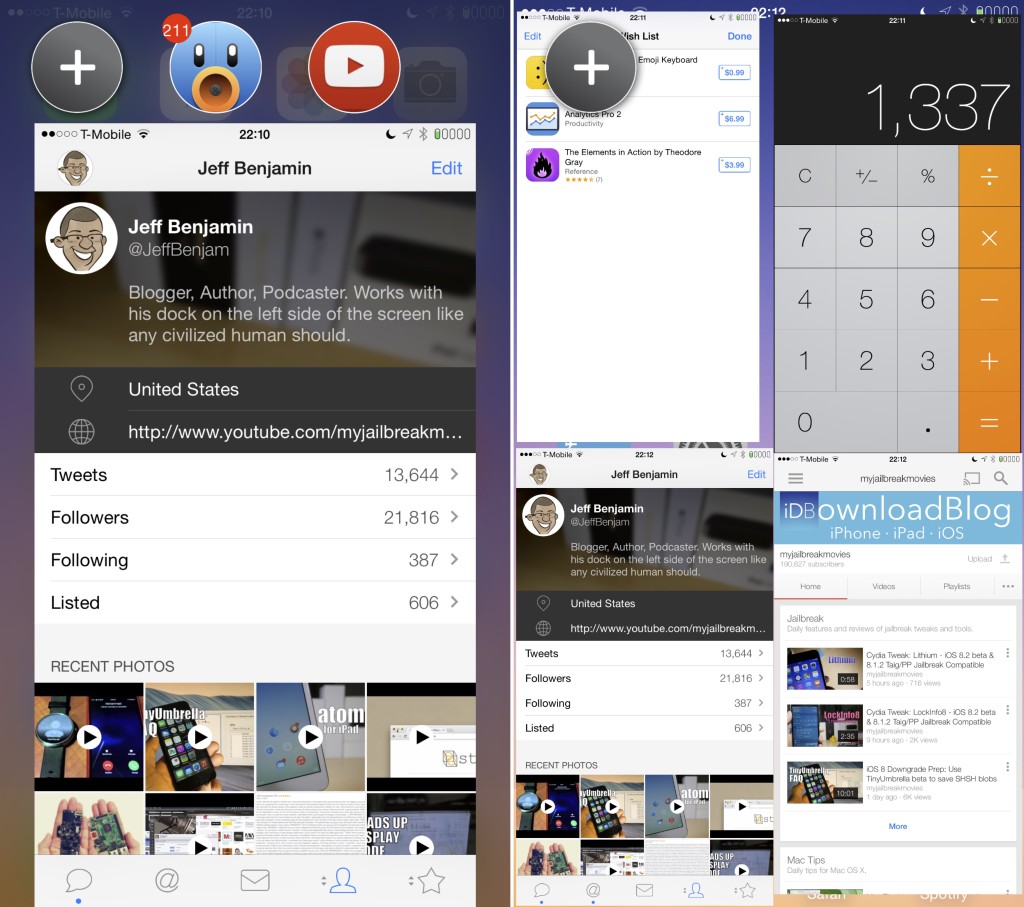
For many individuals, getting the job done can be best performed through multi-tasking. This is why it is important for them to have useful tools readily available so they can breeze through their daily tasks without any question. For a while, this has been a struggle for iOS device owners. But thanks to new tools, multi-tasking can be achieved easily.
One of the recent tools that iOS users can use to help make their multi-tasking experience a lot better is Multify, an upcoming tweak from John Corbett and Joel Einbinder. Together, the two have developed a tweak that truly promises to be a multi-tasking tool for iOS device users. While there are other tweaks that have attempted to provide the same assistance such as this, Multify promises to be an easy-to-use tweak and is as stable as one can get. Here’s what you need to know about the tweak.
The first impression one can get about Multify is that it is a clone of AppHeads. But after using the tweak, you’ll start to realize that it’s far from what it appears to be. Compared to AppHeads, Multify is centered in multi-tasking using multiple apps on the screen at one time. With the help of the edit mode available on the tweak, you can easily adjust the location and size of your apps on the fly. You can easily have up to four apps running at the same time. And the best part about this is that you can interact with all of these apps side-by-side.
The most enjoyable part about Multify is that it is a very simple tweak that makes use of only three multi-tasking gestures: Launch Activation, Edit Activation, and Open App Activation. Through these gestures, you can make use of the tweak and use it to help you multi-task on the things you need to get done.
Compared to iPhone’s native multi-tasking tool, Multify view is a great and fast way you can browse through your applications. It is even faster than the multi-tasking gestures feature available on the iPad. Soon, you’ll be able to try the tweak by purchasing it at $4.99 on the BigBoss repo. If you want to make use of this tweak, check out updates on when it will be available.
Source: iDownloadBlog


Leave a Reply