• About Us
  • Contact Me
  • Review Request
  • Guest Post
  • iPhone 14 WALLPAPER
    • iPhone XR and iPhone XS Wallpapers
  • Store
  • Gambling
  • iPhone 15 Wallpapers

iPhonecaptain | iOS 17 Tips, Jailbreak Tweaks and App Reviews

"Bringing the Best For Apple Devices Daily"

A2Hosting

  • Home
  • iOS 16 Wallpaper Downloads
    • macOS Ventura Wallpaper Downloads Here
      • MacOS Wallpapers 2022
      • 5K iMac Wallpapers Stock
    • iOS 10 Wallpaper
    • iOS 9 Wallpaper
    • iOS 8 Stock Wallpaper
    • iPhone 7 Wallpaper
      • Super Mario wallpapers for iPhone
      • iPhone 6 Plus HD Wallpaper
      • iPad Air or iPad Mini Retina HD Wallpaper
      • Yosemite Wallpaper
      • iOS 7 Wallpaper
      • Wallpaper New iPad 3
      • iPhone 5 Wallpapers
    • iPhone 6 Wallpapers
  • iPSW Firmware
    • iOS 8 iPSW Downloads
  • Top Cydia Sources 2017
    • Top Cydia Repo 2016
    • Cydia Sources 2014
    • Sources 2013
    • Cydia Sources 2012-13
  • Free Cydia Tweaks
    • Winterboard Themes
    • Favorite Tweaks
    • Top iOS 8 Tweaks
  • App Reviews
    • PRODUCT REVIEWS
    • Review Request
  • iPhone Tips
    • Giveaway
  • iPA Library
    • Emulators
    • iOS 10 Hacks
  • Jailbreak Download
You are here: Home / News / Apple: “Oleg Pliss Attack through Individual User Account”

Apple: “Oleg Pliss Attack through Individual User Account”

May 28, 2014 By Marie Leave a Comment

  • Facebook
  • Twitter
  • Pinterest
  • LinkedIn
  • Reddit
  • Comments
  • Subscribe

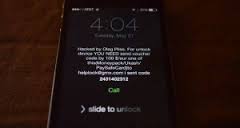
Oleg Pliss

Last night, we reported about Mac and iOS users who awoke to discover that their devices have been remotely locked by hackers claiming to have gained access through the device owner’s Find My iPhone account. In exchange of reinstating the owner’s account, the hacker demanded a ransom for himself.

Apple has responded to the issue and has released a statement, insisting that their iCloud service was not breached by the hack. Instead, Apple has discovered that individual user accounts of affected devices were compromised via social engineering or password reuse. Responding to this attack, this is the statement released by Apple:

“Apple takes security very seriously and iCloud was not compromised during this incident. Impacted users should change their Apple ID password as soon as possible and avoid using the same user name and password for multiple services. Any users who need additional help can contact AppleCare or visit their local Apple Retail Store.”

The initial reports on the attack came from an Apple support forum, wherein affected iOS users based in Australia shared the problem to other users. Soon enough, the rest of the world discovered they were also targeted by the hacker who hid under the name ‘Oleg Pliss.’

As of this writing, there is still no update on how the hacker was able to gain entry to these accounts. Noting that the attack came a day after rumors of Apple preparing a home automation market presentation for next week’s WWDC 2014, a similar attack may be even more serious. If ever, Apple seriously needs to work on this issue.


Source: 9to5mac

  • Facebook
  • Twitter
  • Pinterest
  • LinkedIn
  • Reddit
  • Comments
  • Subscribe

Filed Under: News Tagged With: Find My iPhone, Oleg Pliss

Latest Post

  • How To Set Up Family Sharing iOS 16: Stop Buying Same Apps For Others 2022

    How To Set Up Family Sharing iOS 16: Stop Buying Same Apps For Others 2022
  • Best iOS 16 Apps To Earn Money From Home in 2022

    Best iOS 16 Apps To Earn Money From Home in 2022
  • 9 Extra Ways to Hang Up a Call on Your iPhone 2022

    9 Extra Ways to Hang Up a Call on Your iPhone 2022
  • Reminders App iOS 16: How to Use Templates on Your iPhone, iPad, or Mac

    Reminders App iOS 16: How to Use Templates on Your iPhone, iPad, or Mac
  • How To Speed Up Slow iPhone,iPad, iPod 2022

    How To Speed Up Slow iPhone,iPad, iPod 2022

Stay Up To Date On All The Latest iOS News!!!

Never miss out just because you can't be here everyday... Join us for the latest and most popular news. Get our best delivered in your inbox with our latest and best guides and How to's.

About Marie

Leave a Reply Cancel reply

Your email address will not be published. Required fields are marked *

Search The Site

SiteGround

Ad - Web Hosting from SiteGround - Crafted for easy site management. Click to learn more.

RSS Follow Our RSS

  • iOS 26: Adaptive Power, Clear Icons and More – Key Features Explained

Archives

RETURN TO TOP OF PAGE   Privacy Policy

Copyright © 2026 iphonecaptain Developed by Bytesflow Technologies