• About Us
  • Contact Me
  • Review Request
  • Guest Post
  • iPhone 14 WALLPAPER
    • iPhone XR and iPhone XS Wallpapers
  • Store
  • Gambling
  • iPhone 15 Wallpapers

iPhonecaptain | iOS 17 Tips, Jailbreak Tweaks and App Reviews

"Bringing the Best For Apple Devices Daily"

A2Hosting

  • Home
  • iOS 16 Wallpaper Downloads
    • macOS Ventura Wallpaper Downloads Here
      • MacOS Wallpapers 2022
      • 5K iMac Wallpapers Stock
    • iOS 10 Wallpaper
    • iOS 9 Wallpaper
    • iOS 8 Stock Wallpaper
    • iPhone 7 Wallpaper
      • Super Mario wallpapers for iPhone
      • iPhone 6 Plus HD Wallpaper
      • iPad Air or iPad Mini Retina HD Wallpaper
      • Yosemite Wallpaper
      • iOS 7 Wallpaper
      • Wallpaper New iPad 3
      • iPhone 5 Wallpapers
    • iPhone 6 Wallpapers
  • iPSW Firmware
    • iOS 8 iPSW Downloads
  • Top Cydia Sources 2017
    • Top Cydia Repo 2016
    • Cydia Sources 2014
    • Sources 2013
    • Cydia Sources 2012-13
  • Free Cydia Tweaks
    • Winterboard Themes
    • Favorite Tweaks
    • Top iOS 8 Tweaks
  • App Reviews
    • PRODUCT REVIEWS
    • Review Request
  • iPhone Tips
    • Giveaway
  • iPA Library
    • Emulators
    • iOS 10 Hacks
  • Jailbreak Download
You are here: Home / Cydia Tweaks / Best iOS 8 Cydia Tweaks of The Week July 5 Edition

Best iOS 8 Cydia Tweaks of The Week July 5 Edition

July 6, 2015 By Mitch Stevens Leave a Comment

  • Facebook
  • Twitter
  • Pinterest
  • LinkedIn
  • Reddit
  • Comments
  • Subscribe

Jailbreak tweaks for this week are out and if you’ve been keeping a close eye on the new ones available, you’ll be pretty impressed with the selection for this week.  Yes, it’s time for our Jailbreak tweaks of the week but just a day late.  If you’ve been waiting for these tweaks, we’ve got you covered and ready to know more about the best of the best this week.

Mirmir

Mirmir

Formerly called Mimir, Mirmir is a new jailbreak tweak that brings to life the true essence of multitasking.  As long as you have a jailbroken iPhone or iPad device running iOS 8.3 or 8.4.  With this tweak, you simply have to download it for $3.99 so you can use it on your device.  And once you have it installed, you’ll get to experience side-by-side window multitasking on your screen.  You’ll wonder why you never discovered it before!
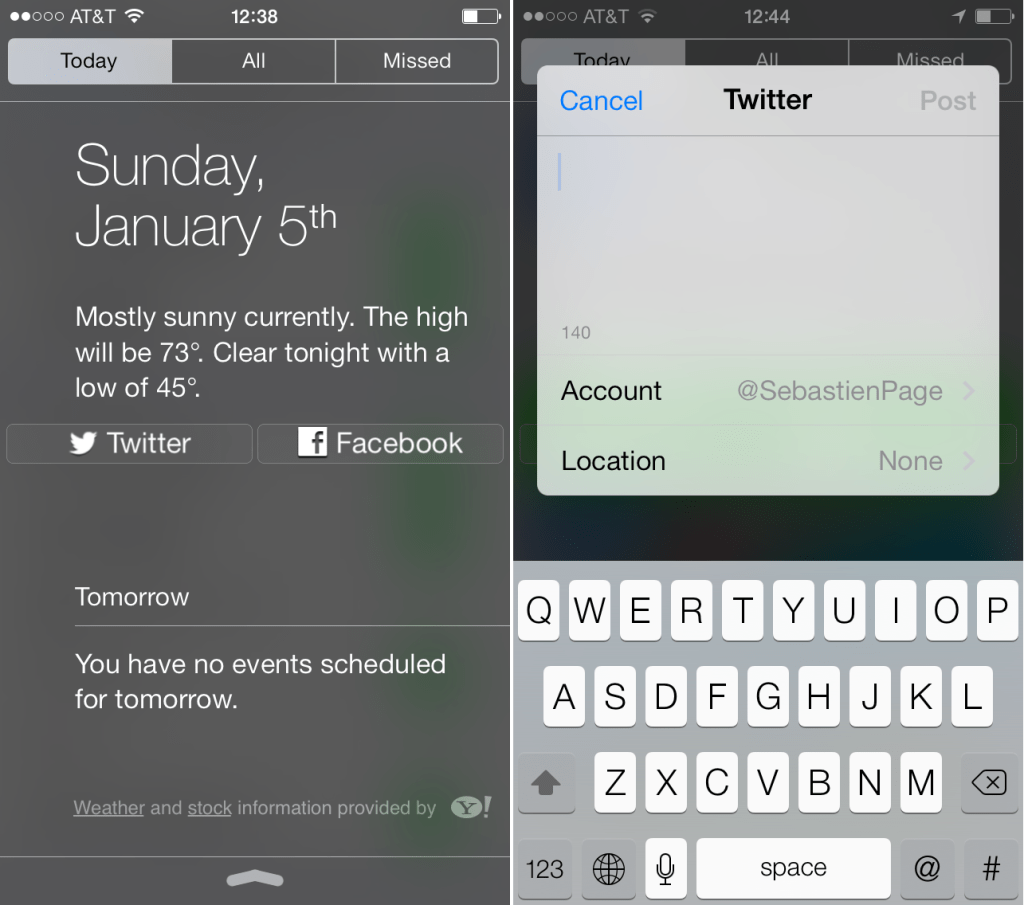
Twitter++

Twitter++

Twitter++ is a free jailbreak tweak that allows its users to add easy list access as well as other features.  So if you’re tired of the stock Twitter app and want to boost up your experience of using this social networking platform, you can download the tweak and install it in your device.  With the tweak, you can easily share images and links from tweets, share direct messages, share tweets outside of twitter, download videos, and many more.  There are so many new features you can find on this tweak that it’s seriously worth checking out.  The fact that it’s free gives it plenty more reason why you should be using the tweak on your device.
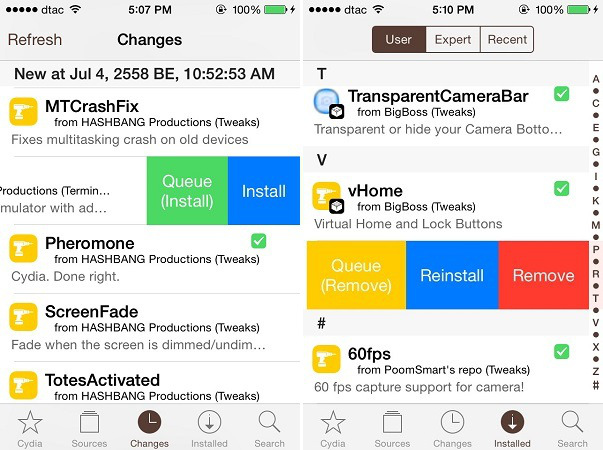
SwipeForMore

SwipeForMore

SwipeForMore is a jailbreak tweak that was specifically designed for Cydia.  If you’re looking for a tool to use that can help you save lots of time, SwipeForMore will do this for you.  Once you’ve installed SwipeForMore on your device, swiping on a tweak will lead you to your install or uninstall options.  This saves you a lot of time since you no longer have to go through each tweak’s page to manage it.

Whoozit

Whoozit

If you hate receiving calls from unknown numbers, Whoozit is a jailbreak tweak that’s got you covered.  Through this tweak, you can be more aware of the number calling you, even if he is not in your contact list.  Since it works with TrueCaller, every phone call you receive will be screened for the full name of the person who holds the number.  This serves as a hug help so you can get rid of annoying spam calls.

Battivator

Battivator 

Just like its name promises it to be, Battivator is a tweak that will give you options to create profiles and even set actions as soon as your device reaches a certain battery level.  With this tweak installed, you no longer have to fumble around and try to kill apps that are running in the background.  Since each action has been appropriately set, you’ll be able to save battery juice when it’s running low.  This tweak is available for $1.49.

Do you see any tweak that could potentially be good for your device?  Share them with us!

  • Facebook
  • Twitter
  • Pinterest
  • LinkedIn
  • Reddit
  • Comments
  • Subscribe

Filed Under: Cydia Tweaks, TaiG Cydia Tweaks 2015 Tagged With: cydia tweaks

Latest Post

  • How To Set Up Family Sharing iOS 16: Stop Buying Same Apps For Others 2022

    How To Set Up Family Sharing iOS 16: Stop Buying Same Apps For Others 2022
  • iOS 16 Brings Battery Drain Plus Tips to Improve Battery Life After iOS 16

    iOS 16 Brings Battery Drain Plus Tips to Improve Battery Life After iOS 16
  • How To Remove Photo Background iOS 16 iPhone 14

    How To Remove Photo Background iOS 16 iPhone 14
  • Reminders App iOS 16: How to Use Templates on Your iPhone, iPad, or Mac

    Reminders App iOS 16: How to Use Templates on Your iPhone, iPad, or Mac
  • iOS 16 Features Exclusive Only to Newest iOS Devices

    iOS 16 Features Exclusive Only to Newest iOS Devices

Stay Up To Date On All The Latest iOS News!!!

Never miss out just because you can't be here everyday... Join us for the latest and most popular news. Get our best delivered in your inbox with our latest and best guides and How to's.

About Mitch Stevens

Author of E-book, “Learn Jailbreaking & Top Tweaks” in Amazon.and enjoys anything tech related.  Just recently released an E-course in Udemy for Yosemite Mac users titled, "Learn Yosemite Plus Tips To Become 10x More Productive".  A "MUST Purchase" for users wishing to get the most from their Mac daily whether your a student or work from home.  Guarantee you will be glad you did.

Leave a Reply Cancel reply

Your email address will not be published. Required fields are marked *

Search The Site

SiteGround

Ad - Web Hosting from SiteGround - Crafted for easy site management. Click to learn more.

RSS Follow Our RSS

  • iOS 26: Adaptive Power, Clear Icons and More – Key Features Explained

Archives

RETURN TO TOP OF PAGE   Privacy Policy

Copyright © 2026 iphonecaptain Developed by Bytesflow Technologies