
SimplePasscodeButtons is a new jailbreak tweak that simplies your lockscreen passcode. With this tweak, you can customize how you want your lockscreen passcode to look like when asked for a passcode.
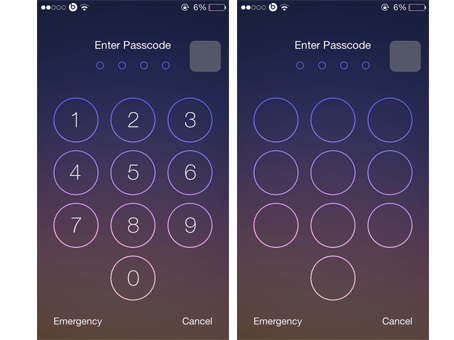
Once you install the tweak, you’ll have to configure it via settings to make the lockscreen passcode look the way you want. As you can see from the screenshot above, you can hide the numbers from the passcode keys or hide both the numbers and letters. Take a look at our video to find out how the tweak works.
This tweak might not appeal to everyone but you can still try it out for free if you’re interested. If you’re looking into simplifying the look of your lockscreen passcode then you must go for numbers only however if you’re concerned about privacy and security so that no one is able to find out your passcode, you must hide both the numbers and letters as many people try to find your passcode and not the positions that you tap on the locsckreen passcode.
If you are interested in removing the numbers and text in your lockscreen passcode or would like to improve your device security, you must try SimplePasscodeButtons. This tweak available in Cydia for free via BigBoss repo and works on all iPhone, iPad and iPod running iOS 7 and later.
Please take a moment to share this post socially and Subscribe before leaving. By doing those to small things for us you are helping us grow and giving us the enthusiasm to keep writing and creating videos which are being watched and read. We also would appreciate users following us on Facebook and Twitter. Watch our last Top Best 10 Cydia Tweaks iOS 7 video here. Enjoy the video.


Leave a Reply