• About Us
  • Contact Me
  • Review Request
  • Guest Post
  • iPhone 14 WALLPAPER
    • iPhone XR and iPhone XS Wallpapers
  • Store
  • Gambling
  • iPhone 15 Wallpapers

iPhonecaptain | iOS 17 Tips, Jailbreak Tweaks and App Reviews

"Bringing the Best For Apple Devices Daily"

A2Hosting

  • Home
  • iOS 16 Wallpaper Downloads
    • macOS Ventura Wallpaper Downloads Here
      • MacOS Wallpapers 2022
      • 5K iMac Wallpapers Stock
    • iOS 10 Wallpaper
    • iOS 9 Wallpaper
    • iOS 8 Stock Wallpaper
    • iPhone 7 Wallpaper
      • Super Mario wallpapers for iPhone
      • iPhone 6 Plus HD Wallpaper
      • iPad Air or iPad Mini Retina HD Wallpaper
      • Yosemite Wallpaper
      • iOS 7 Wallpaper
      • Wallpaper New iPad 3
      • iPhone 5 Wallpapers
    • iPhone 6 Wallpapers
  • iPSW Firmware
    • iOS 8 iPSW Downloads
  • Top Cydia Sources 2017
    • Top Cydia Repo 2016
    • Cydia Sources 2014
    • Sources 2013
    • Cydia Sources 2012-13
  • Free Cydia Tweaks
    • Winterboard Themes
    • Favorite Tweaks
    • Top iOS 8 Tweaks
  • App Reviews
    • PRODUCT REVIEWS
    • Review Request
  • iPhone Tips
    • Giveaway
  • iPA Library
    • Emulators
    • iOS 10 Hacks
  • Jailbreak Download
You are here: Home / Cydia Apps / ProWidgets: New Way Of Multitasking On Your iOS 7 Device

ProWidgets: New Way Of Multitasking On Your iOS 7 Device

March 24, 2014 By Mitch Stevens Leave a Comment

  • Facebook
  • Twitter
  • Pinterest
  • LinkedIn
  • Reddit
  • Comments
  • Subscribe

ProWidget is a brand new tweak created from scratch up and has recently hit the Cydia in which it allows you to use, minimize or close certain apps via widgets and at the same time work on your device without the certain apps interrupting your work. Multitasking is a pain as you have to double click the home button to bring up the app switcher and then launch or close a certain app and then go back to home screen and launch a new app. This tweak makes it very simple and easy to use.
ProWidgets1


Installing this tweak adds a preference pane to your settings menu. When installing this tweak, CCloader will be installed automatically if your iDevices lack it. CCloader is a must for this tweak as it adds quick launch button to your control center. However CCloader in iPad is very limited and buggy sometimes so it is best to assign activator action to enable the widgets.

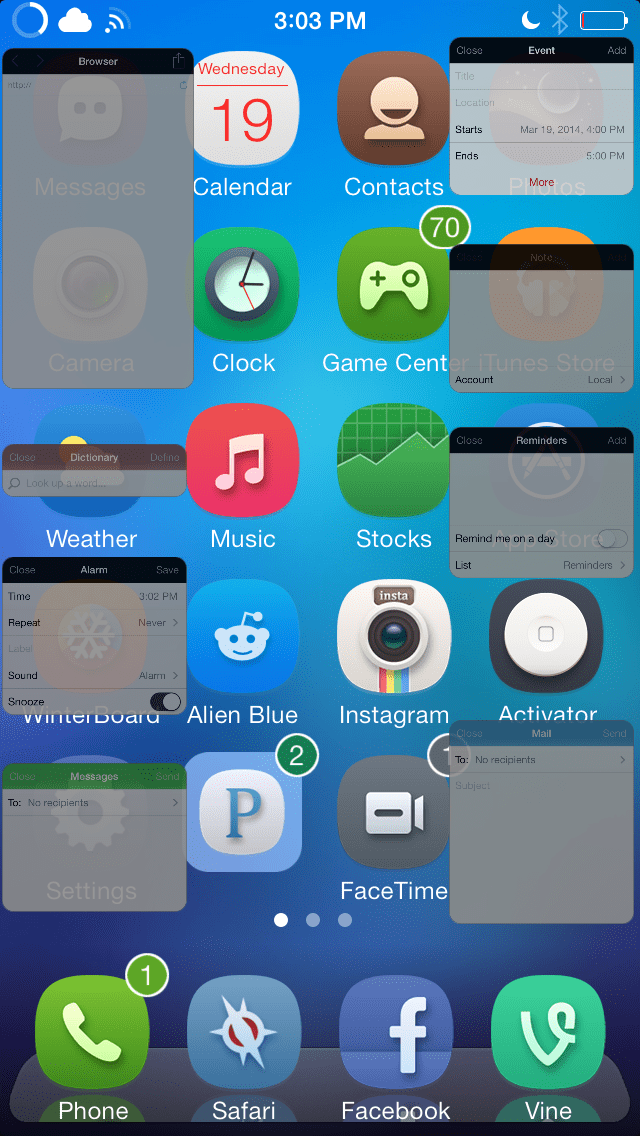
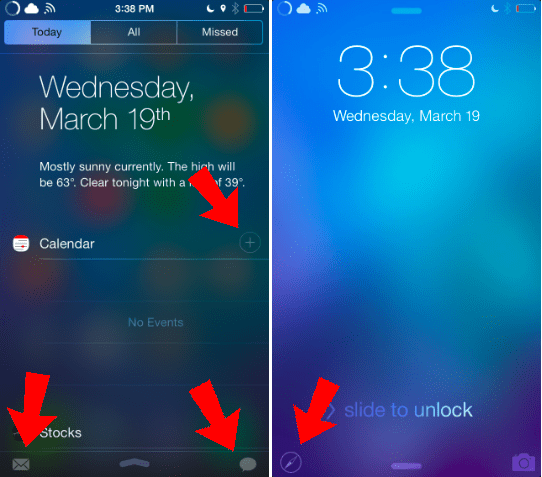
This tweak comes with a set of certain widgets which includes: alarm, browser, calendar, dictionary, quick compose mail, notes, reminder and timer. You can have access or activate these widgets through notification center and on the lock screen. For composing an email, the button is located at the bottom left corner of the notification center. For message or sms it is located at the bottom right corner of the notification center.
ProWidgets11

After you have activated the widgets either through Control center, activator gesture or Notification center you can minimize it by double tapping on the widget’s title. Once it is minimized, you can double tap it again to close it. The most convenient way to close a widget is tapping on the “Close” button to close the displayed widget.

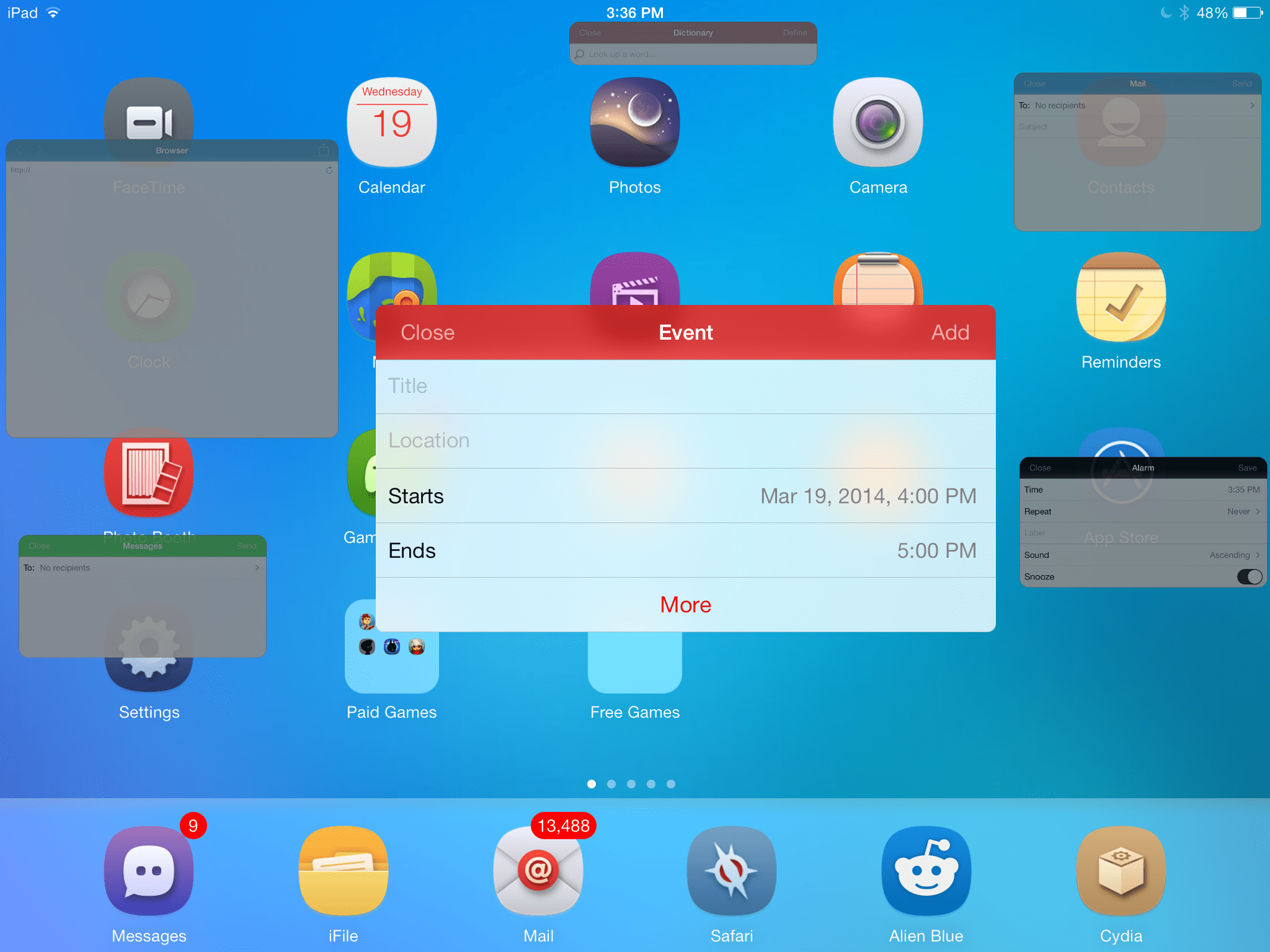
If you are using iPhone, minimizing it will locate the widgets to either side of the home screen. However for iPad you can minimize and freely move the widgets anywhere you want. I favor this tweak on iPad as it gives you room to minimize, and move the widgets freely with no restrictions. Moreover, if you are using more than 4 widgets on iPhone there is a considerable lag due to the processing of multiple widgets. However these widgets on iPhone are for a quick reference and then dismiss it when done.
ProWidgets10

From the preference pane, you have the option to choose from 4 themes for the widgets background. You can choose to match it with your phone’s background, or choose from the list. In addition and in near future you can install widget themes by using a url. As in the preference pane you will notice “install theme via URL” which will allow you to install third party themes.

I would wholeheartedly recommend this tweak as it has added a new dimension to jailbreak community as they can add additional widgets to this tweak or add new themes for a particular widget and has added an extra level to multitasking by making it very easy to navigate within your apps without ever launching the app switcher. It allows you to have access to information anywhere from the iOS without ever interrupting your current task. Prowidget is available on Cydia for $2.99. Happy downloading and hope you will enjoy using it.

I suggest you better take a look at our short video tutorial on ProWidgets:

  • Facebook
  • Twitter
  • Pinterest
  • LinkedIn
  • Reddit
  • Comments
  • Subscribe

Filed Under: Cydia Apps, Cydia news, Cydia Tweaks, favorite cydia apps, iOS 7, iOS 7 Cydia Tweak, iOS 7 Paid Cydia Tweaks, Paid Cydia Tweak, Premium Cydia Tweaks 2014 Tagged With: best tweak, best tweaks 2014, cydia, favorite tweak, ios 7, ipad, iPhone 5S, jailbreak, paid tweak, ProWidgets, quick launch, tweaks, widgets

Latest Post

  • Top Five Ways To Improve Battery Drain on iOS 16 iPhone | iPad | iPod

    Top Five Ways To Improve Battery Drain on iOS 16 iPhone | iPad | iPod
  • Best iOS 16 Apps To Earn Money From Home in 2022

    Best iOS 16 Apps To Earn Money From Home in 2022
  • Favorite iOS 16 Wallpapers iPhone 14 or iPhone 14 Plus

    Favorite iOS 16 Wallpapers iPhone 14 or iPhone 14 Plus
  • Macbook Air M2 Wallpaper Downloads

    Macbook Air M2 Wallpaper Downloads
  • iOS 16 Hidden Features

    iOS 16 Hidden Features

Stay Up To Date On All The Latest iOS News!!!

Never miss out just because you can't be here everyday... Join us for the latest and most popular news. Get our best delivered in your inbox with our latest and best guides and How to's.

About Mitch Stevens

Blogger, Youtube Content Creator and Online instructor of courses relating to Youtube, Facebook, and Blogging, Learn to build a blog from the ground up using Wordpress plus others.  Mitch has over 20 years experience teaching in the public schools.  He was forced to quit teaching in public schools around 2010 due to health issues and started iPhonecaptain.  Try one of the courses and start a new career today.  Feel free to reach out to Mitch for help relating to making money online also. One of his
Best Sellers is titled, How to earn $4000 Monthly Making Youtube Videos grab a copy and start your journey today.

Leave a Reply Cancel reply

Your email address will not be published. Required fields are marked *

Search The Site

SiteGround

Ad - Web Hosting from SiteGround - Crafted for easy site management. Click to learn more.

RSS Follow Our RSS

  • ????????????? ???????????? ????????? ???????? ???????? 1

Archives

RETURN TO TOP OF PAGE   Privacy Policy

Copyright © 2026 iphonecaptain Developed by Bytesflow Technologies