• About Us
  • Contact Me
  • Review Request
  • Guest Post
  • iPhone 14 WALLPAPER
    • iPhone XR and iPhone XS Wallpapers
  • Store
  • Gambling
  • iPhone 15 Wallpapers

iPhonecaptain | iOS 17 Tips, Jailbreak Tweaks and App Reviews

"Bringing the Best For Apple Devices Daily"

A2Hosting

  • Home
  • iOS 16 Wallpaper Downloads
    • macOS Ventura Wallpaper Downloads Here
      • MacOS Wallpapers 2022
      • 5K iMac Wallpapers Stock
    • iOS 10 Wallpaper
    • iOS 9 Wallpaper
    • iOS 8 Stock Wallpaper
    • iPhone 7 Wallpaper
      • Super Mario wallpapers for iPhone
      • iPhone 6 Plus HD Wallpaper
      • iPad Air or iPad Mini Retina HD Wallpaper
      • Yosemite Wallpaper
      • iOS 7 Wallpaper
      • Wallpaper New iPad 3
      • iPhone 5 Wallpapers
    • iPhone 6 Wallpapers
  • iPSW Firmware
    • iOS 8 iPSW Downloads
  • Top Cydia Sources 2017
    • Top Cydia Repo 2016
    • Cydia Sources 2014
    • Sources 2013
    • Cydia Sources 2012-13
  • Free Cydia Tweaks
    • Winterboard Themes
    • Favorite Tweaks
    • Top iOS 8 Tweaks
  • App Reviews
    • PRODUCT REVIEWS
    • Review Request
  • iPhone Tips
    • Giveaway
  • iPA Library
    • Emulators
    • iOS 10 Hacks
  • Jailbreak Download
You are here: Home / App Reviews / Rssie iOS App Review

Rssie iOS App Review

April 16, 2014 By Marie Leave a Comment

  • Facebook
  • Twitter
  • Pinterest
  • LinkedIn
  • Reddit
  • Comments
  • Subscribe

Rssie-iOS-app-01

Nowadays, RSS reader apps are available abundantly on the app store; each with a corresponding price and set of features. Mostly, some of them are inclusive of a few other unnecessary features that make using the app a little disheartening. Ever since Google shut down its RSS reader service, users have always been on the lookout for the next best thing. The arrival of Rssie iOS app has led people to finally find the much-awaited app to take the place of Google’s RSS reader service. The question now is, what makes it so special?

Compared with other RSS feed reader apps, Rssie is a very straightforward app. It makes no fuss over its features and its interface as it can easily be understood by almost anyone. Composed of only three screens, users will have no difficulty in trying to understand and use the app without the supervision of someone more knowledgeable than them.

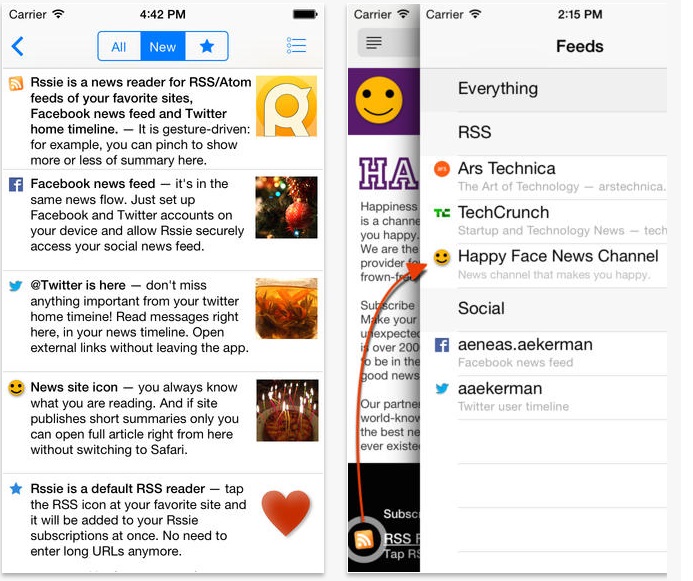
The first screen is for the ‘Feeds’ section, wherein all of the RSS feeds subscribed to by the user appears in a chronological order. Additionally, users can easily subscribe to social media sites like Facebook and Twitter, so they can keep up with a certain topic that best interests them.

Rssie-iOS-app-02

The second screen to appear is when a particular feed has been selected by the user. This allows the user to have an easy time in reading the news information on the feed he has selected. Like most RSS readers, this screen shows a series of posts inclusive of one photo linked to that website’s post.

Lastly, the third screen is where the user can add a new feed to the app. Adding a feed can be done so easily and without the need for any technicalities. Working in a cooperative manner with Safari, Rssie iOS app sets itself apart from its competition. As a result, users can easily add a new feed to their app. For favorite posts, you can easily tap on the star so that it later gets pulled up on the app’s stared posts feed screen. Because each screen is in a clean and easy to understand feature, there is no doubt why this is an app that almost anyone can enjoy!

Rssie iOS app costs $1.99 to download and is compatible with iPhone, iPad, and iPod touch devices running on iOS 7.0 or later.

  • Facebook
  • Twitter
  • Pinterest
  • LinkedIn
  • Reddit
  • Comments
  • Subscribe

Filed Under: App Reviews Tagged With: RSS Reader, Rssie, Rssie iOS app

Latest Post

  • Top Five Ways To Improve Battery Drain on iOS 16 iPhone | iPad | iPod

    Top Five Ways To Improve Battery Drain on iOS 16 iPhone | iPad | iPod
  • How To Speed Up Slow iPhone,iPad, iPod 2022

    How To Speed Up Slow iPhone,iPad, iPod 2022
  • Disable iOS 16 Apple Tracking 2022: Stop Apple Tracking Online iPhone 14

    Disable iOS 16 Apple Tracking 2022: Stop Apple Tracking Online iPhone 14
  • iOS 16 Features Exclusive Only to Newest iOS Devices

    iOS 16 Features Exclusive Only to Newest iOS Devices
  • How To Remove Photo Background iOS 16 iPhone 14

    How To Remove Photo Background iOS 16 iPhone 14

Stay Up To Date On All The Latest iOS News!!!

Never miss out just because you can't be here everyday... Join us for the latest and most popular news. Get our best delivered in your inbox with our latest and best guides and How to's.

About Marie

Leave a Reply Cancel reply

Your email address will not be published. Required fields are marked *

Search The Site

SiteGround

Ad - Web Hosting from SiteGround - Crafted for easy site management. Click to learn more.

RSS Follow Our RSS

  • iOS 26: Adaptive Power, Clear Icons and More – Key Features Explained

Archives

RETURN TO TOP OF PAGE   Privacy Policy

Copyright © 2026 iphonecaptain Developed by Bytesflow Technologies