
Snapper is a recently released tweak that allows you to take a screenshot of your device and pin it on your screen for later use. It allows you to take a screenshot of a specific position of your device. It cuts out the screenshot and pin it on your home screen.
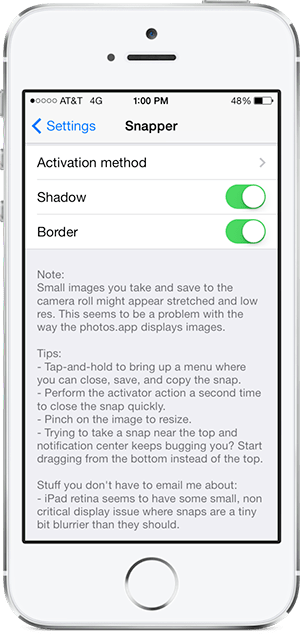
Once you have installed the tweak, you need to go to the stock Setting app to view its preference. For you to activate and use this tweak, the tweak needs assign an activator gesture. Click on the “Activation Method” and choose from the list of gestures which best suits you. Other options are available as to whether to include a “Shadow” and “Border”, again you can select/deselect them as you like. Once all the settings have been configured, its time to take some snapshots.
Return to your home screen, to activate the “Snapper” perform the activator gesture you have selected/assigned. Once the gesture is performed, the screen becomes dim suggesting that the tweak has been activated. Draw on your screen where you want to take a screenshot, you’ll notice a rectangular box been drawn. This is where the Snapper takes a screenshot. Once you draw the rectangular box, release your finger and the screen becomes un-dim. You’ll notice the screenshot pinned to your screen. The screenshot remains on your screen until you chose to dismiss it. To dismiss it, tap and hold on the screenshot until a pop up menu occurs. 5 options appear in the menu: Close, Save, Save+Close,Copy and Copy+Close. Choosing the Save option, saves the screenshot to your camera roll. Choosing the Copy option saves it on the clipboard for later use.
This tweak is available on Cydia for $0.99.
To better understand how this tweak work and see it in action, take a look at this walkthrough video of Snapper:


Leave a Reply