• About Us
  • Contact Me
  • Review Request
  • Guest Post
  • iPhone 14 WALLPAPER
    • iPhone XR and iPhone XS Wallpapers
  • Store
  • Gambling
  • iPhone 15 Wallpapers

iPhonecaptain | iOS 17 Tips, Jailbreak Tweaks and App Reviews

"Bringing the Best For Apple Devices Daily"

A2Hosting

  • Home
  • iOS 16 Wallpaper Downloads
    • macOS Ventura Wallpaper Downloads Here
      • MacOS Wallpapers 2022
      • 5K iMac Wallpapers Stock
    • iOS 10 Wallpaper
    • iOS 9 Wallpaper
    • iOS 8 Stock Wallpaper
    • iPhone 7 Wallpaper
      • Super Mario wallpapers for iPhone
      • iPhone 6 Plus HD Wallpaper
      • iPad Air or iPad Mini Retina HD Wallpaper
      • Yosemite Wallpaper
      • iOS 7 Wallpaper
      • Wallpaper New iPad 3
      • iPhone 5 Wallpapers
    • iPhone 6 Wallpapers
  • iPSW Firmware
    • iOS 8 iPSW Downloads
  • Top Cydia Sources 2017
    • Top Cydia Repo 2016
    • Cydia Sources 2014
    • Sources 2013
    • Cydia Sources 2012-13
  • Free Cydia Tweaks
    • Winterboard Themes
    • Favorite Tweaks
    • Top iOS 8 Tweaks
  • App Reviews
    • PRODUCT REVIEWS
    • Review Request
  • iPhone Tips
    • Giveaway
  • iPA Library
    • Emulators
    • iOS 10 Hacks
  • Jailbreak Download
You are here: Home / Cydia Tweaks / Add Virtual Home Button With Assistive+

Add Virtual Home Button With Assistive+

January 29, 2014 By Mitch Stevens Leave a Comment

  • Facebook
  • Twitter
  • Pinterest
  • LinkedIn
  • Reddit
  • Comments
  • Subscribe

If you’ve got a broken home button or a power button, we’ve got a solution for you. A new jailbreak tweak has been released in Cydia that acts like a virtual home button.
IMG_2876

Assistive+ is a new jailbreak tweak that attempts work like a virtual home or power button. This means that once you install the tweak, a button similar to assistive touch will appear on your screen. Tapping on the button once will act like a home button and goes to the home screen. In addition, double tapping on the button will open the app switcher while triple taps will lock your device.

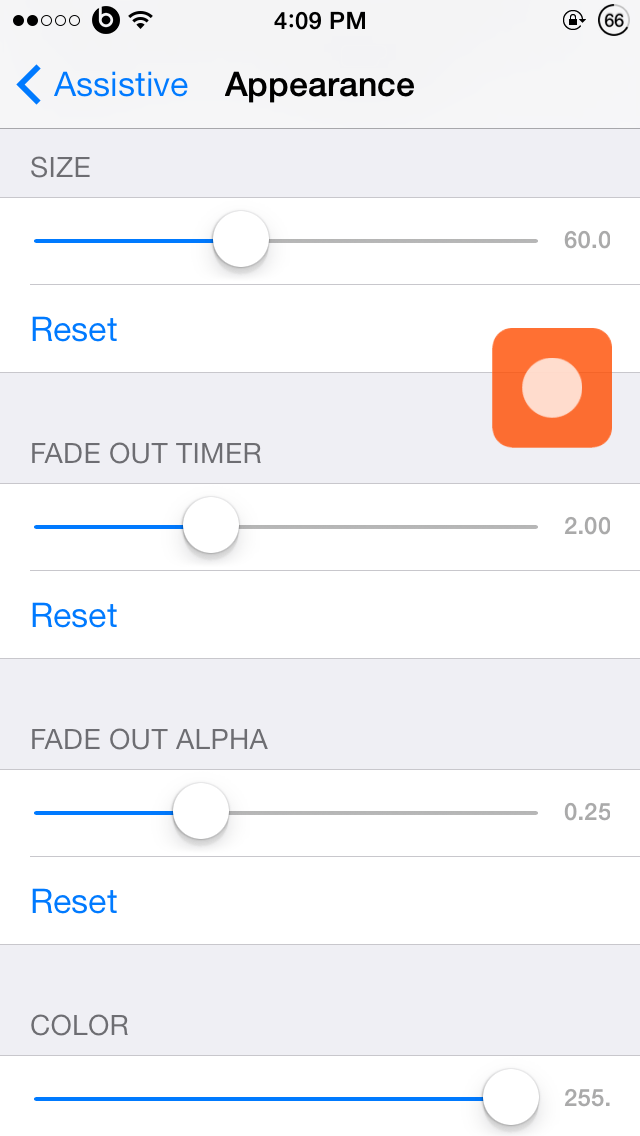
However it offers much more functionality’s as well. Holding on the assistive+ button will open up four slots around it to which you can add various toggles. To do this, you’ll open settings and scroll down to Assistive+ and open it. You’ll find a range of configurations you can make. You can enable/disable the tweak, add a toggle to top right, top left, bottom left and bottom right slots when you hold onto the assistive+ button. In addition, you can customize the appearance of the button such as its size, fade out timer and the color. Check out the demonstration of Assistive+ in our video below.

Although you can make use of the stock Assistive Touch feature, Assistive+ is much more convenient and quicker to use. It’s quite useful if you have a broken home or power button. You can grab Assistive+ from Cydia for $1.49 and works on all iPhone, iPad and iPod devices running iOS 6, 7 & probably iOS 5 as well.

Please take a moment to share this post socially and Subscribe before leaving.  By doing those to small things for us you are helping us grow and giving us the enthusiasm to keep writing and creating videos which are being watched and read.  We also would appreciate users following us on Facebook and Twitter.  Watch our last Top Best 10 Cydia Tweaks iOS 7 video here.  Enjoy the video.

  • Facebook
  • Twitter
  • Pinterest
  • LinkedIn
  • Reddit
  • Comments
  • Subscribe

Filed Under: Cydia Tweaks Tagged With: Assistive+, cydia, cydia tweak, jailbreak, tweak

Latest Post

  • How To Remove Photo Background iOS 16 iPhone 14

    How To Remove Photo Background iOS 16 iPhone 14
  • How To Set Up Family Sharing iOS 16: Stop Buying Same Apps For Others 2022

    How To Set Up Family Sharing iOS 16: Stop Buying Same Apps For Others 2022
  • Macbook Air M2 Wallpaper Downloads

    Macbook Air M2 Wallpaper Downloads
  • How To Speed Up Slow iPhone,iPad, iPod 2022

    How To Speed Up Slow iPhone,iPad, iPod 2022
  • Reminders App iOS 16: How to Use Templates on Your iPhone, iPad, or Mac

    Reminders App iOS 16: How to Use Templates on Your iPhone, iPad, or Mac

Stay Up To Date On All The Latest iOS News!!!

Never miss out just because you can't be here everyday... Join us for the latest and most popular news. Get our best delivered in your inbox with our latest and best guides and How to's.

About Mitch Stevens

Blogger, Youtube Content Creator and Online instructor of courses relating to Youtube, Facebook, and Blogging, Learn to build a blog from the ground up using Wordpress plus others.  Mitch has over 20 years experience teaching in the public schools.  He was forced to quit teaching in public schools around 2010 due to health issues and started iPhonecaptain.  Try one of the courses and start a new career today.  Feel free to reach out to Mitch for help relating to making money online also. One of his
Best Sellers is titled, How to earn $4000 Monthly Making Youtube Videos grab a copy and start your journey today.

Leave a Reply Cancel reply

Your email address will not be published. Required fields are marked *

Search The Site

SiteGround

Ad - Web Hosting from SiteGround - Crafted for easy site management. Click to learn more.

RSS Follow Our RSS

  • iOS 26: Adaptive Power, Clear Icons and More – Key Features Explained

Archives

RETURN TO TOP OF PAGE   Privacy Policy

Copyright © 2026 iphonecaptain Developed by Bytesflow Technologies