• About Us
  • Contact Me
  • Review Request
  • Guest Post
  • iPhone 14 WALLPAPER
    • iPhone XR and iPhone XS Wallpapers
  • Store
  • Gambling
  • iPhone 15 Wallpapers

iPhonecaptain | iOS 17 Tips, Jailbreak Tweaks and App Reviews

"Bringing the Best For Apple Devices Daily"

A2Hosting

  • Home
  • iOS 16 Wallpaper Downloads
    • macOS Ventura Wallpaper Downloads Here
      • MacOS Wallpapers 2022
      • 5K iMac Wallpapers Stock
    • iOS 10 Wallpaper
    • iOS 9 Wallpaper
    • iOS 8 Stock Wallpaper
    • iPhone 7 Wallpaper
      • Super Mario wallpapers for iPhone
      • iPhone 6 Plus HD Wallpaper
      • iPad Air or iPad Mini Retina HD Wallpaper
      • Yosemite Wallpaper
      • iOS 7 Wallpaper
      • Wallpaper New iPad 3
      • iPhone 5 Wallpapers
    • iPhone 6 Wallpapers
  • iPSW Firmware
    • iOS 8 iPSW Downloads
  • Top Cydia Sources 2017
    • Top Cydia Repo 2016
    • Cydia Sources 2014
    • Sources 2013
    • Cydia Sources 2012-13
  • Free Cydia Tweaks
    • Winterboard Themes
    • Favorite Tweaks
    • Top iOS 8 Tweaks
  • App Reviews
    • PRODUCT REVIEWS
    • Review Request
  • iPhone Tips
    • Giveaway
  • iPA Library
    • Emulators
    • iOS 10 Hacks
  • Jailbreak Download
You are here: Home / Cydia Tweaks / HUD Customizer: Allows You To Customize Your Volume HUD

HUD Customizer: Allows You To Customize Your Volume HUD

March 8, 2014 By Mitch Stevens 1 Comment

  • Facebook
  • Twitter
  • Pinterest
  • LinkedIn
  • Reddit
  • Comments
  • Subscribe

This tweak allows some modification to the volume HUD. Do you want to change the Volume colors, background, name, position, size, animation and many more? If yes, then this tweak is for your. HUD customizer brings all the available features of modifying your volume HUD.
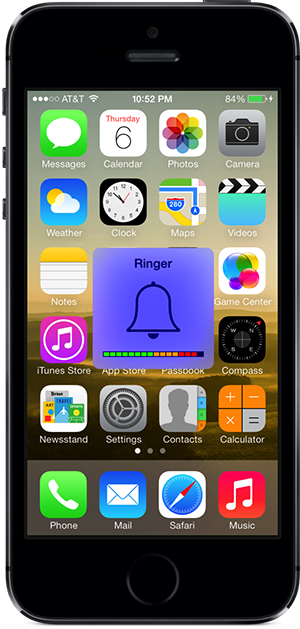
HUDcustomize

With this tweak installed you can change the color of the volume background, the progress block color, the position, size, add animation, add custom title and subtitle and many. Below are the many examples of this tweak:

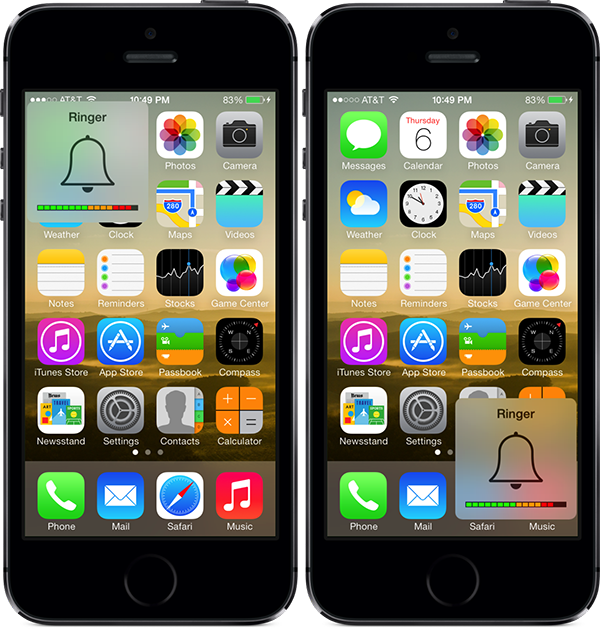
hudcustomizercolors


hudcustomizerpositionexample


Installing this tweak adds a preference pane to the settings menu.

From here you can enable or disable the tweak as you demand. From the appearance tab you can set the size, opacity, the display time (time it remains on your screen you use the volume controls), adding corners to your volume HUD, selecting the thickness of the border, and selecting the border color (either from the presert or from adjusting RGB sliders).

In the “Content” tab you can add a custom title to the HUD, set a custom subtitle and choose whether to display the “ringer bell” image in the volume HUD. In “Position” tab you can select where to display the volume HUD by either using the X&Y slider or selecting from the presets given. You can change the HUD background color from the “Background” tab. You can also change the color of the volume progress block and add animation to your volume HUD.

Overall, this tweak is packed with all the features necessary to completely modify the volume HUD. If you want to give this tweak a try, it is available on Cydia for $1.49.


  • Facebook
  • Twitter
  • Pinterest
  • LinkedIn
  • Reddit
  • Comments
  • Subscribe

Filed Under: Cydia Tweaks Tagged With: cydia, HUD, HUD customizer, ios 7, iPhone 5, iPhone 5S, jailbreak, paid tweak, tweaks, volume

Latest Post

  • iOS 16 Brings Battery Drain Plus Tips to Improve Battery Life After iOS 16

    iOS 16 Brings Battery Drain Plus Tips to Improve Battery Life After iOS 16
  • iOS 16 Hidden Features

    iOS 16 Hidden Features
  • Favorite iOS 16 Wallpapers iPhone 14 or iPhone 14 Plus

    Favorite iOS 16 Wallpapers iPhone 14 or iPhone 14 Plus
  • Reminders App iOS 16: How to Use Templates on Your iPhone, iPad, or Mac

    Reminders App iOS 16: How to Use Templates on Your iPhone, iPad, or Mac
  • How To Speed Up Slow iPhone,iPad, iPod 2022

    How To Speed Up Slow iPhone,iPad, iPod 2022

Stay Up To Date On All The Latest iOS News!!!

Never miss out just because you can't be here everyday... Join us for the latest and most popular news. Get our best delivered in your inbox with our latest and best guides and How to's.

About Mitch Stevens

Blogger, Youtube Content Creator and Online instructor of courses relating to Youtube, Facebook, and Blogging, Learn to build a blog from the ground up using Wordpress plus others.  Mitch has over 20 years experience teaching in the public schools.  He was forced to quit teaching in public schools around 2010 due to health issues and started iPhonecaptain.  Try one of the courses and start a new career today.  Feel free to reach out to Mitch for help relating to making money online also. One of his
Best Sellers is titled, How to earn $4000 Monthly Making Youtube Videos grab a copy and start your journey today.

Trackbacks

  1. Volume Mixer: Different Volume Sliders In Notification Center says:
    March 27, 2014 at 6:38 pm

    […] addition, you can position the volume mixer widget in the notification center as you […]

    Reply

Leave a Reply Cancel reply

Your email address will not be published. Required fields are marked *

Search The Site

SiteGround

Ad - Web Hosting from SiteGround - Crafted for easy site management. Click to learn more.

RSS Follow Our RSS

  • iOS 26: Adaptive Power, Clear Icons and More – Key Features Explained

Archives

RETURN TO TOP OF PAGE   Privacy Policy

Copyright © 2026 iphonecaptain Developed by Bytesflow Technologies